Looking for an alternative to Roblox Studio in 2026? You’re probably ready to build something bigger than a Roblox experience. Maybe you want to publish on Steam, sell your game directly, control your graphics, or use an engine that feels more like a real standalone game development tool.
Roblox Studio is a great place to start. It gives you scripting, multiplayer, publishing, and a huge audience in one place. Roblox reported 111.8 million average daily active users in Q2 2025, so the platform is massive. ([Roblox Investor Relations][1]) But the same thing that makes Roblox powerful also makes it limiting: your game lives inside Roblox.
“Roblox teaches you how to think like a creator. A standalone engine teaches you how to ship like an indie developer.”
This guide compares four strong Roblox Studio alternatives for developers who want to move forward in 2026: Cave Engine, Godot, Unity, and Unreal Engine. Each one has a different type of developer in mind, so the best choice depends on what kind of game you want to build next.
Quick Comparison: Which Roblox Studio Alternative Should You Pick?
Before we go deep, here’s the simple answer. Roblox developers usually want something easy to learn, fast to use, and powerful enough to publish real standalone games. That means the best engine is usually the one that keeps your workflow simple while giving you more freedom than Roblox.
| Engine | Best for | Scripting | Main reason to choose it |
|---|---|---|---|
| Cave Engine | Standalone 3D PC games | Python | Best balance between simplicity, speed, and full game ownership |
| Godot | Free indie games and open-source projects | GDScript or C# | Free, lightweight, and flexible |
| Unity | Commercial indie games across many platforms | C# | Huge ecosystem, assets, tutorials, and platform support |
| Unreal Engine | High-end 3D games and advanced visuals | Blueprint or C++ | Best visuals and AAA-level tools |
The shortest version is this: choose Cave Engine when you want the easiest path from Roblox-style scripting to standalone 3D PC games. Choose Godot when you want a free open-source engine. Choose Unity when you want the biggest asset and tutorial ecosystem. Choose Unreal when visuals matter more than simplicity.
Why Roblox Developers Look for Alternatives
Roblox Studio works very well for Roblox experiences. You can create a game, publish it to Roblox, monetize with Robux, and reach players without building your own distribution pipeline. Roblox also gives creators official tools, documentation, publishing workflows, and creator resources through Roblox Creator Hub. ([Creator Hub][2])
The problem starts when your goal changes. Roblox games are published to Roblox, and that platform controls the player environment, distribution rules, economy, and many technical limits. That setup works for social games, tycoons, simulators, obbies, and Roblox-native experiences, but it gets restrictive when you want your own executable, your own launcher, your own Steam page, or your own rendering pipeline.
Roblox creators also need to think about monetization. Roblox DevEx lets creators exchange earned Robux for real money, and Roblox says creators earned over $1 billion globally from March 2024 to March 2025 through DevEx. ([Roblox][3]) That’s impressive, but it still means your business depends on the Roblox economy. A standalone engine gives you another path: sell your game directly, publish on Steam, release on itch.io, or build your own community around your own product.
What You Should Look for After Roblox Studio
When you leave Roblox Studio, you lose some comfort. Roblox hides a lot of engine complexity from you, which is great when you’re learning. A traditional engine gives you more control, but it also expects you to handle more of the project yourself.
That’s why Roblox developers should look for five things in a new engine: simple scripting, fast iteration, built-in gameplay systems, good 3D tools, and real publishing freedom. You want an engine that helps you move forward instead of making you restart from zero.
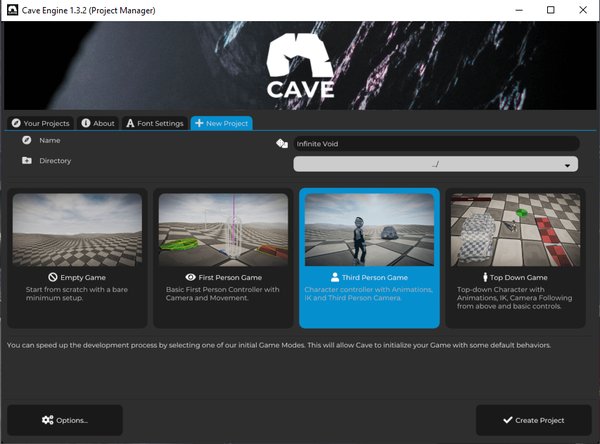
1. Cave Engine: The Best Roblox Studio Alternative for Standalone 3D PC Games
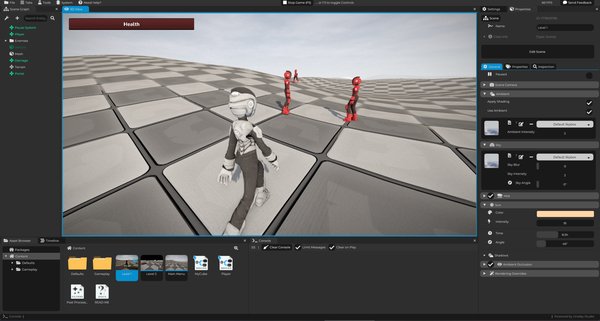
Cave Engine is the most natural option here if you’re a Roblox developer who wants to build real standalone 3D games without jumping straight into a giant engine. It keeps the scripting side simple, while the heavy engine systems run in fast C++ code. That makes it feel friendly for creators who already understand the idea of scripting gameplay on top of an engine.
The biggest difference is freedom. Roblox Studio helps you publish Roblox experiences. Cave Engine helps you build standalone PC games that you can release outside Roblox, including on Steam, itch.io, or your own website. That changes the entire direction of your game development career.
Why Cave Feels Familiar to Roblox Developers
Roblox developers already understand high-level scripting. In Roblox, you use Lua to control gameplay inside the Roblox platform. In Cave, you use Python to control gameplay inside a standalone 3D engine.
That transition makes sense. Python is simple, readable, popular, and useful outside game development too. Cave uses Python for game logic while the engine backend handles performance-heavy systems in C++. You get a workflow that stays approachable without giving up the power of a native engine.
Here’s a basic Cave-style component example:
import cave

class PlayerLogic(cave.Component):
    def start(self, scene: cave.Scene):
        pass

    def update(self):
        events = cave.getEvents()

    def end(self, scene: cave.Scene):
        pass
If you’re coming from Roblox, this style should feel understandable. You create logic, attach it to game objects, and control what happens every frame. The difference is that now you’re building a standalone game instead of an experience locked to one platform.
Why Cave Is Strong for Indie Developers
Cave Engine focuses on speed. Projects open fast, the editor avoids heavy visible compilation steps, and the workflow aims to keep you creating instead of waiting. That matters a lot for solo developers and small teams.
Cave also includes many systems you usually need in a 3D game:
- Entity component architecture
- Python scripting
- Bullet physics
- Character and vehicle controllers
- Animation system
- Terrain tools
- Particle system
- UI system
- Timeline system for cutscenes and events
- Entity templates for reusable objects
- Built-in profiler and optimization tools
This is where Cave becomes very attractive for Roblox developers. You don’t leave Roblox just to drown in engine setup. You get a real 3D engine that still respects fast creation.
Choose Cave Engine If...
Choose Cave if you want to make 3D desktop games, keep scripting simple, and publish your work outside Roblox. It’s especially strong if you want to move from Roblox-style creation to real indie game development without spending months fighting engine complexity.
You can learn more here: Cave Engine. You can also compare it with the broader list in Best Roblox Studio Alternatives for Indie Developers in 2026.
2. Godot: The Free Open-Source Alternative to Roblox Studio
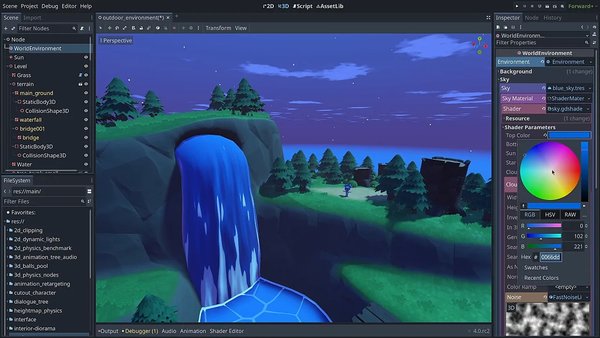
Godot is one of the most popular choices for developers who want a free engine with no royalties and no subscription fees. It’s open source, released under the MIT license, and can be used for commercial projects. ([Godot Engine][4]) That makes it a very safe option for creators who want full ownership and control.
Godot is also lightweight compared to Unity and Unreal. It opens quickly, has a friendly editor, and uses a scripting language called GDScript that many beginners find easy to learn. For Roblox developers, GDScript may feel approachable because it focuses on simple gameplay scripting rather than heavy engine programming.
Why Godot Works for Roblox Developers
Godot gives you freedom. You can create desktop games, mobile games, 2D games, 3D games, tools, prototypes, and commercial projects without platform lock-in. That alone makes it a serious alternative to Roblox Studio.
The engine also has a strong node-based workflow. Roblox developers coming from parts, models, scripts, and services will need to adjust, but the mental model is still manageable. You create objects, attach scripts, build scenes, and connect behavior.
Where Godot May Feel Different
Godot is very flexible, but that flexibility can create extra decisions. You may need to build more systems yourself depending on your project. Advanced 3D games can require more custom work, especially when compared with engines that already include more specialized production tools.
That doesn’t make Godot weak. It simply means Godot is best when you like open-source tools, want total freedom, and don’t mind building parts of your workflow yourself.
Choose Godot If...
Choose Godot if you want a free, open-source engine and you’re comfortable learning a new workflow. It’s a great next step for Roblox developers who want independence, especially for 2D games, stylized projects, prototypes, and small indie games.
3. Unity: The Biggest Ecosystem for Roblox Developers Moving Up
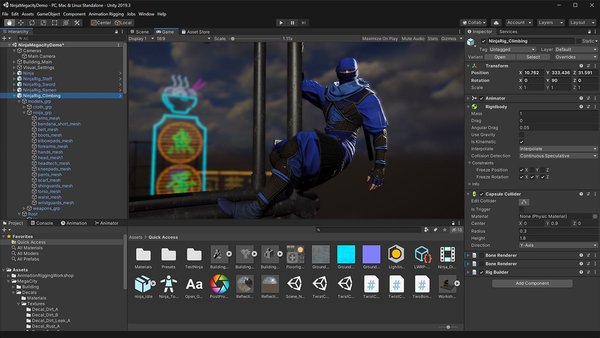
Unity is one of the most common engines Roblox developers consider after Roblox Studio. It has a massive ecosystem, thousands of tutorials, a large Asset Store, and support for many platforms. If you want to find a tutorial for almost anything, Unity probably has one.
Unity uses C#, which is more structured than Lua or Python, but still very friendly compared to C++. For Roblox developers who want a professional engine with a huge amount of learning material, Unity is a serious option.
Why Unity Works for Roblox Developers
Unity is strong because it has answers everywhere. Need a third-person controller tutorial? You’ll find one. Need a mobile export guide? You’ll find one. Need a plugin for dialogue, inventory, networking, UI, shaders, or animation? The ecosystem is huge.
That can make Unity feel like a safe next step. Many commercial indie games were made with Unity, and many studios still use it for production. Unity Personal also has a $200,000 financial threshold under current pricing rules, according to Unity’s official pricing information. ([Unity][5])
Where Unity Can Slow Roblox Developers Down
Unity can feel heavier than Roblox Studio. You may deal with packages, render pipelines, assemblies, project settings, plugins, editor versions, and platform-specific configuration. That’s normal for a large engine, but it can surprise developers who are used to Roblox’s simpler publishing flow.
Unity is powerful, but it asks you to manage more. That tradeoff works well when you need its ecosystem and platform reach. It feels less ideal when you only want a fast and focused path to a small 3D PC game.
Choose Unity If...
Choose Unity if you want the largest tutorial ecosystem and broad platform support. It’s a strong option for mobile games, commercial indie projects, and developers who want a mainstream engine with a lot of community knowledge.
4. Unreal Engine: The Most Powerful Roblox Studio Alternative
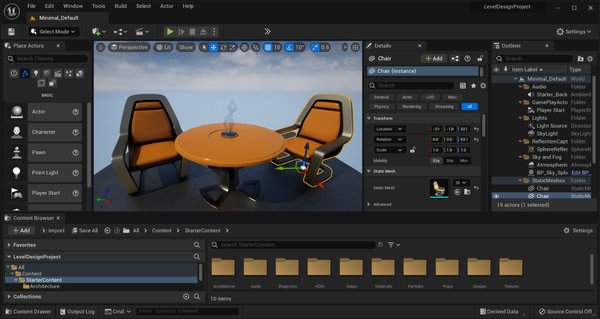
Unreal Engine is the most advanced engine on this list. It’s used in AAA games, high-end 3D production, cinematic projects, and visually ambitious indie games. If you want the strongest graphics pipeline, Unreal is hard to ignore.
Unreal also gives you Blueprint, a visual scripting system that lets you build gameplay logic without writing everything in C++. For some Roblox developers, Blueprint can feel exciting because it lets you create complex logic visually.
Why Unreal Works for Roblox Developers
Unreal gives you professional-level tools from day one. You get strong rendering, animation tools, cinematic systems, physics, materials, landscapes, and a huge library of learning resources. If your dream is to build realistic 3D games, Unreal gives you the tools to chase that.
The engine is also commercially viable. Under Epic’s standard Unreal Engine license, games pay a 5% royalty on lifetime gross revenue above $1 million, with Epic Games Store revenue handled differently under Epic’s terms. ([Unreal Engine][6])
Where Unreal Can Be Too Much
Unreal can overwhelm Roblox developers. The editor is large, projects can get heavy, shader compilation can take time, and the engine expects you to understand a lot of systems. Blueprint helps, but the full engine still carries AAA-level complexity.
That makes Unreal a better choice for developers who want high-end visuals and are willing to spend more time learning the tool. For small solo projects, it can be more engine than you need.
Choose Unreal If...
Choose Unreal if you want realistic graphics, advanced rendering, cinematic tools, or a serious AAA-style workflow. It’s the best choice here for visual ambition, but it demands patience.
Cave vs Godot vs Unity vs Unreal for Roblox Developers
The best Roblox Studio alternative depends on your next goal. A Roblox developer building a small standalone 3D PC game has different needs than a team building a multiplayer shooter or a mobile game.
| Goal | Best pick |
|---|---|
| Fast standalone 3D PC game development | Cave Engine |
| Free and open-source development | Godot |
| Biggest tutorial and asset ecosystem | Unity |
| Best graphics and AAA tools | Unreal Engine |
| Easiest scripting transition from Roblox-style logic | Cave Engine |
| Best no-royalty open-source option | Godot |
| Best mainstream commercial engine ecosystem | Unity |
| Best visual quality ceiling | Unreal Engine |
For Roblox developers, Cave is the most interesting option because it focuses on the gap between beginner-friendly creation and full standalone game development. It gives you a real engine workflow while keeping scripting simple through Python. That makes it a very direct path for creators who feel ready to leave Roblox’s platform limits behind.
What Makes a Good Roblox Studio Alternative?
A good Roblox Studio alternative should give you more freedom without destroying your momentum. Roblox Studio is fast because it gives you a closed ecosystem where many hard decisions are already made. A traditional engine gives you more power, but it also gives you more responsibility.
That’s why the best alternatives share a few traits. They let you build games independently, use accessible scripting, iterate quickly, and publish your game outside one platform. They also give you enough built-in systems so you don’t need to build every feature from scratch.
You Need Real Publishing Freedom
Publishing is one of the biggest reasons to leave Roblox Studio. Roblox lets you publish experiences to Roblox, while traditional engines let you ship standalone games. That means your game can have its own executable, store page, pricing, updates, and business model.
This is a major step. Once you move to a standalone engine, you start thinking like an indie developer instead of only thinking like a platform creator.
You Need a Workflow You’ll Actually Use
Many developers choose engines based on power, then quit because the workflow feels too heavy. That’s a mistake. The best engine is the one that helps you finish your game.
For Roblox developers, this matters even more. You’re used to pressing play quickly, changing scripts fast, and seeing results. A good next engine should protect that creative rhythm as much as possible.
Final Recommendation
Start with Cave Engine if your goal is to move from Roblox Studio to standalone 3D PC games. It gives you Python scripting, fast iteration, built-in systems, and a focused workflow for indie developers. That makes it one of the strongest Roblox Studio alternatives in 2026.
Choose Godot if you want something free and open source. Choose Unity if you want the biggest ecosystem and broad platform support. Choose Unreal Engine if you want high-end visuals and you’re ready for a much larger tool.
Roblox Studio is a great beginning. Your next engine decides what kind of developer you become after Roblox.
Learn more about Cave here: Cave Engine.
“The best Roblox Studio alternative is the one that gives you more freedom without slowing down your development.”
Frequently Asked Questions
What is the best alternative to Roblox Studio in 2026?
The best alternative depends on your goal. Cave Engine is the best fit for Roblox developers who want to build standalone 3D PC games with simple Python scripting. Godot is best for free open-source development, Unity is best for ecosystem support, and Unreal is best for high-end visuals.
Can I make a game like Roblox outside Roblox Studio?
You can make multiplayer games, sandbox games, tycoon-style games, simulators, and social games in other engines, but you’ll need to build or integrate the systems Roblox gives you automatically. Traditional engines give you more control, but they don’t give you Roblox’s built-in platform and player network.
Is Cave Engine easier than Unity or Unreal for Roblox developers?
Cave is designed to be simpler and faster for indie 3D desktop development. Unity and Unreal are very powerful, but they also come with larger workflows, more configuration, and more technical decisions. Roblox developers who want a focused standalone PC game engine may find Cave easier to approach.
Is Godot a good Roblox Studio alternative?
Yes. Godot is a strong Roblox Studio alternative if you want a free open-source engine. It works well for indie developers, especially for 2D games, prototypes, and stylized projects. For complex 3D games, you may need more custom setup depending on your project.
Should Roblox developers learn Unity?
Unity is worth learning if you want a mainstream commercial engine with a huge ecosystem. It uses C#, has many tutorials, supports many platforms, and has a large asset marketplace. The downside is that Unity can feel heavier than Roblox Studio.
Should Roblox developers learn Unreal Engine?
Unreal is worth learning if you want high-end 3D graphics, cinematic tools, or AAA-style production features. It can be overwhelming for beginners, so it’s usually better for developers who already know what kind of game they want to build and are ready to spend time learning the engine.