Cave Engine 1.4.1 is now live. This update focuses on performance, workflow improvements, and new APIs that make your development faster and more scalable. If you're building 3D desktop games with Python, this release directly improves runtime efficiency, editor usability, and overall stability. If you don't know yet, Cave Engine is a high-performance 3D game engine built for desktop development, combining a C++ core with Python scripting for rapid iteration. It targets developers who want full control over rendering, systems, and performance without sacrificing productivity.
With growing adoption and a rapidly expanding user base, updates are shipping faster, and 1.4.1 reflects that momentum. Last release was not even 2 weeks ago. :)
This is a minor release, but it delivers meaningful gains across rendering, tooling, and API consistency. It also reflects direct feedback from hundreds of new users joining the ecosystem in the last weeks. Let’s go straight into what changed.
DDS Texture Support
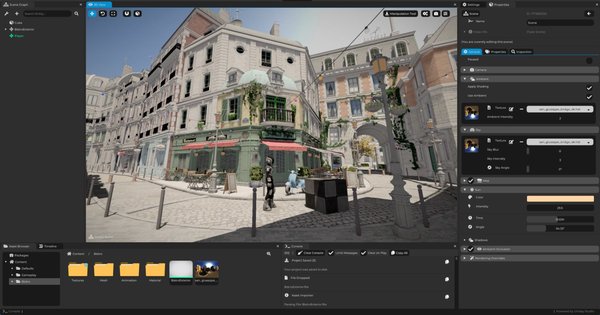
Cave now supports importing .dds textures, including most major formats and compressed variants. This gives you more flexibility when working with optimized texture pipelines and external tools that already export DDS formats.
Transform Matrices Are Cached
Transform matrices are now cached by default across the engine, including TransformComponent, TerrainComponent and Armature bones. This improves both rendering and physics calculations.
In internal stress tests with 10,000+ unique entities, this change alone resulted in an average gain of ~10 FPS. The engine can now better predict when transforms need recalculation, reducing unnecessary work per frame.
Python API Changes (Required Update)
Because of this optimization, transform getters no longer return references.
This no longer works:
transf.getPosition() = cave.Vector3(1,0,0)
You must now explicitly set values:
transf.setPosition(cave.Vector3(1,0,0))
The method getPositionCopy() was removed, since getPosition() already returns a copy.
This trade-off was necessary to guarantee cache consistency and unlock the performance gains. Be aware that if you're porting an existing project from older Cave versions, this may break your code, so you'll have to apply the fixes suggested above.
New Profiler UI
The Profiler UI has been redesigned to improve clarity and usability. You can now identify performance bottlenecks faster and with more accurate data. Check the Profiler Tab on the Right:
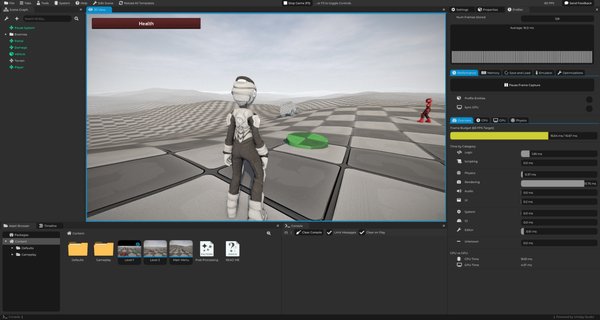
Internally, the profiling system also received improvements. You should expect more precise measurements and better visibility into what impacts your frame time.
Faster Render Graph Evaluation
Render graph evaluation has been optimized with additional caching and threading improvements. Large scenes previously consumed way more CPU than desired. With this update, evaluation is significantly faster and more efficient. This improvement also ties directly into the transform caching system.
Critical Analytics Data Collection
Cave now collects basic usage analytics to improve stability and accelerate bug fixing.
This decision was discussed and voted with the community, and most users (92,8% in favor) agreed with the approach. The data collected is strictly technical and does not include your projects, assets, code, or any personal content.
Collected data includes:
- Engine usage patterns (if it opened and closed properly, if the game started and stopped without issues)
- Crash reports
- Export status
This allows better visibility into real-world issues and helps prioritize fixes effectively. The main goal here is to prioritize, fix and improve any issues you may face with Cave, faster.
You will also find a Send Feedback button in the top-right corner of the Editor. You can submit feedback at any time directly from the engine.
New Python API: cave.ui.textAsProp(...)
A new API is available for tool development inside the Editor.
You can now display text as if it were a property field. This improves custom tool UX and allows more consistent integration with the Editor interface.
Improved Debug Bezier Drawing
Scene's addDebugBezier(...) now renders Bezier curves with improved visuals and performance.
You will see:
- Directional arrows moving along the curve
- Smoother rendering
- Better performance with large quantities
You can now work with hundreds of debug Beziers in a scene without performance issues. These remain debug-only and are not included in final builds or in the game while in Play Mode.
PathComponent – New Methods
The PathComponent received several new Python API methods:
-
generateDerivativePath(self, outPath: PathComponent, width: float = 1) Generates a new path offsetting edges to both sides while preserving connectivity.
-
balanceEdgeDirections(self) Reassigns edge directions to reduce directional conflicts in node connections.
-
mergeByDistance(self, distance: float = 0.001) Merges points that are within a specified distance.
-
clear(self) Removes all points and edges from the path.
These additions expand procedural generation and path manipulation workflows.
Improved Documentation Editing
Editing documentation is now more direct. When you open the "Edit" tab of a Documentation Asset, you can modify the entire document inline without spawning a separate window. This reduces friction and improves writing workflows inside the Editor.
Mesh and ImageTexture Optimization
Performance improvements were applied to core systems:
- Mesh's
mergeByDistance(...)is now O(n) instead of O(n²) ImageTextureloading is faster
These changes reduce processing time in large scenes and asset-heavy projects.
Bug Fixes
- Fixed random GPU crashes caused by Dear ImGui
- Fixed OpenGL crashes
- Fixed onboarding window appearing repeatedly after completion
Final Notes
Cave Engine continues to evolve quickly, driven by real usage and direct community feedback. This release focuses on performance, stability, and better tooling, which directly impacts your day-to-day workflow.
If you're already using Cave, update now and take advantage of the improvements.
If you're evaluating game engines for 3D desktop development with Python, this release strengthens Cave as a serious, production-ready option. If that's your case, you can see Cave Engine 1.4.1's Pricing and Plans here:
Learn More about Cave Engine
FAQ
Is Cave Engine good for 3D desktop games?
Yes. Cave is built specifically for high-performance 3D desktop development with a C++ core and Python scripting.
Will transform caching break my code?
Only if you relied on reference returns. You must now use setters like setPosition().
Is analytics data safe?
Yes. Only technical data is collected. No personal files, assets, or code are included.
Is Cave Engine faster after this update?
Yes. Transform caching, render graph optimization, and mesh improvements all contribute to better performance.
Spoilers
For Cave 1.6, here is a small spoiler: