Hi, Guilherme here, the main developer behind Cave Engine, and I'm very happy to write this release note for you.
The past four months have been crazy here in the studio, and we've been developing games and tools like never before. The next game that we are producing here at Uniday Studio is much more complicated than anything else we've done, and because of that, the engine evolved a lot. This release note will hopefully show you this in practice.
Cave Engine 1.4 is literally the best version the engine has ever had. There are countless improvements and fixes, and it's much more stable for both Windows and Linux. Expect a better user experience, better performance, more tools, and advanced features for you to create your games.
What's New?
I will try to highlight the most exciting features here for you, so let's jump right into it and explore.
New Onboarding Tutorials for Newcomers
This is literally the best version EVER to get Cave if you're new. Version 1.4 comes with an onboarding system with your first steps in the engine (integrated in the UI), so you can learn how to test the game, modify it, and even export it as a runtime. I've also improved the in-engine tutorials and documentation a lot to make everyone's life easier.
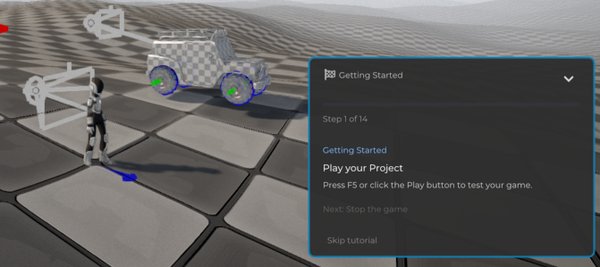
This is part of my effort to, instead of making tutorials, make the engine so easy that they’re not even necessary. :)
New Project Creation Experience
Now creating a new project in Cave is much more exciting and comes with a lot of new features.
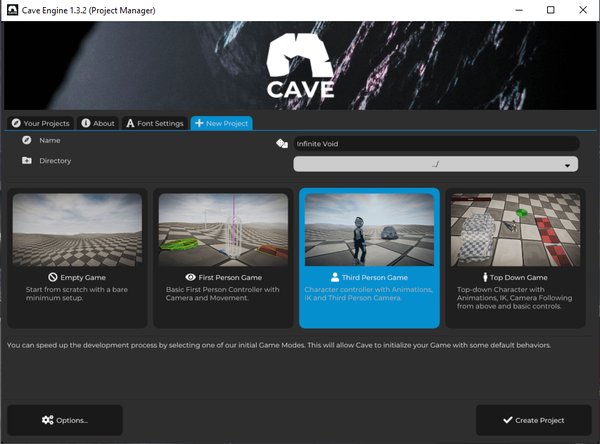
I've completely rewritten the new project menu, and now you can pick between an empty project, a first-person, a third-person, or a top-down game template. The new game templates are also much more stable and complete. I'll talk more about this next. But before I jump to it, one extra new feature for the new project system is the little random game name generator button. Now every time you're out of ideas about what game you should make, simply click it and it will generate a random name for your project that will hopefully give you some inspiration.
New Default Project Assets
When creating a new project, you will have a variety of options to pick from and initialize your game with default assets. This includes things that were already present in Cave, such as:
- Main Menu
- Pause Menu
- First Person Character Controller
- Third Person Character Controller
- Top Down Character Controller
- Fully Animated Proto Character (with inverse kinematics)
- Health Bar and Game Over System
- Level Completion and Next Level System
- Default Scene with a generated Terrain
- Default Mesh Primitives (Cube, Sphere, Cylinder, Plane, Cone)
- Default Test Material
- Procedural Sky Texture (with clouds, stars, sun, etc.)
- README file explaining everything that was added to your new project (and how you can expand it)
But now you also get:
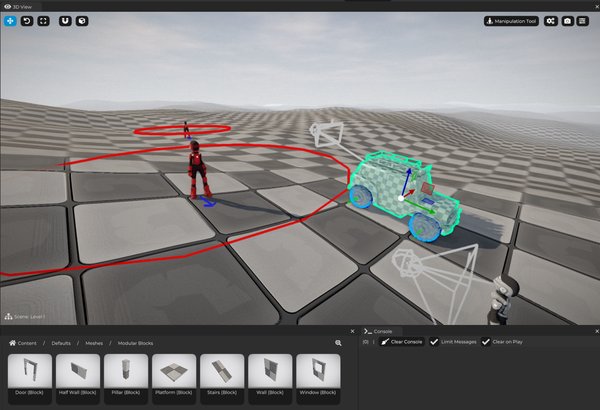
- Improved terrain generation, and now objects added to the scene will align to it.
- Vehicle Controller (with Mesh and Physics) with a template included.
- Enemy template with a basic Wander AI built using Cave's State Machine System.
- More default mesh primitives, this time to give you some blockmesh construction assets (walls, doors, windows, stairs, etc.).
- New default "Ramp" mesh.
Countless Editor UI and UX Improvements
I've made a huge number of improvements in the editor user interface and overall user experience. I'll try to highlight the main ones here so you can explore the rest yourself.
New UI Element Component UI
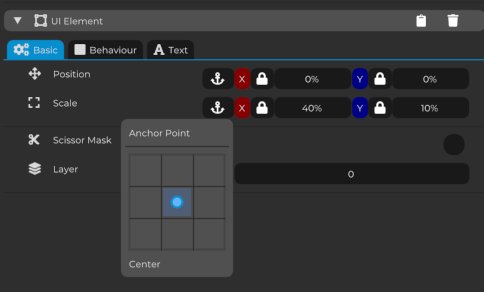
Now it's much easier and more intuitive to set a UIElement's position, scale, and anchor points. I've also made improvements in the Behavior tab.
Python Script Editor Improvements
When you click to open a Python script from the Asset Browser, you can now edit the entire script using the full-height editor directly in the Properties tab. This means you no longer need to click twice to open the script in an external tab. This makes writing code inside Cave's editor much easier.
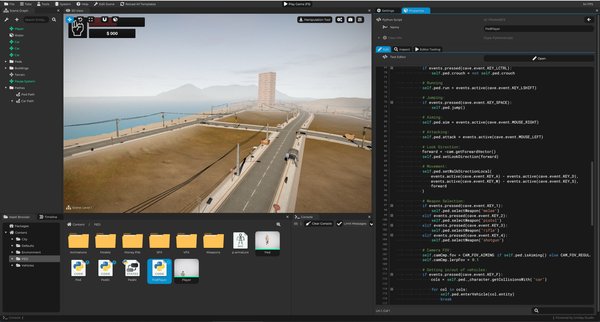
We now also have an Inspect tab to see the contents of your script, and the editor tools now have their own dedicated tab where you can register or reload a tool or run the script in the editor.
Shader Program Editor Improvements
Just like the Python script editor improvements, you no longer need to click somewhere else to fully edit Shader Programs. The vertex and fragment shaders appear directly in the Properties tab for you to edit. You can still open them individually in another tab if you want to.
Console Tab Improvements
There is now a button to copy all messages to the clipboard. This is useful when debugging or sharing console output with someone else.
Proto Character and Vehicle in "New Entity..." Menu
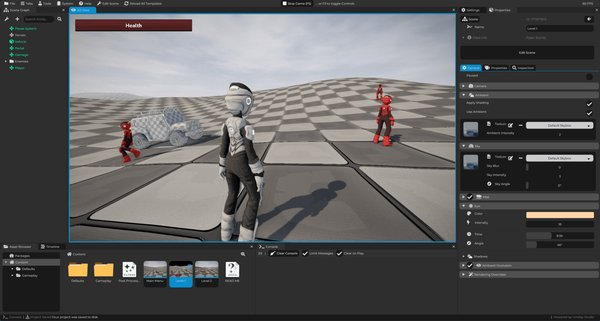
If you haven't deleted the Proto Character or the Vehicle that now comes by default in your new projects, they will appear as an option for you to quickly add them to your scene when you press Shift + A to add a new entity.
Automatically Create a Rigid Body
When dragging a mesh to the scene (from the Asset Browser), you can press Drag + Ctrl to automatically create a rigid body for it.
Blender-like Camera Controls (3D View)
This is likely the most requested feature since Cave Engine was initially released, and now it's finally here. When navigating through the 3D view, you can use the middle mouse button to orbit around objects, just like in Blender.
This feature is experimental, so if you'd like to report anything or suggest improvements, please let me know in our Discord server.
State Machine System Improvements
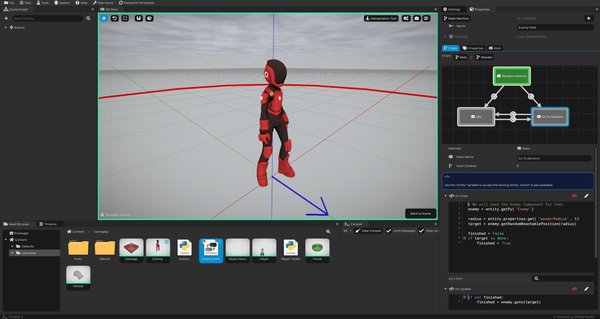
When writing the code for a state transition, you no longer need to access the "from state" local variables as if they were dictionary properties. Instead, you can expect them to be immediately available as local variables.
Transition code before this update (example):
result = state.get("myVar") == 3
After the update (example):
result = myVar == 3
Path Component System Improvements
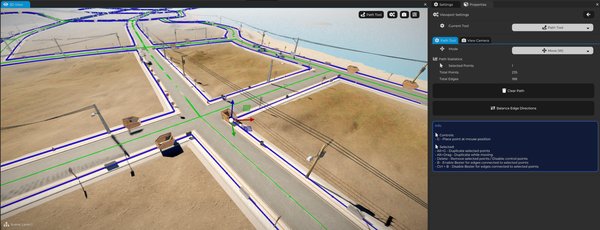
The Path Component and Path Tool were added as experimental in the last Cave version (1.3), and since then they have evolved a lot. For 1.4, the main highlights are the two new PathComponent methods: GetSampleAdvance(...) and GenerateProceduralMesh(...).
The first function allows you to provide a position and get the nearest position on a path component from that input position, plus an advance value. Why is this useful? Because this is essentially everything you need in order to make a character, vehicle, or anything else follow a path.
The second function, as the name suggests, takes a mesh and procedurally places and generates a new mesh along the path component, allowing you to create roads, walls, buildings, and much more.
Terrain System Improvements
The terrain system in Cave received a lot of improvements in this version, and I can already anticipate one thing: it is now much faster to render the entire terrain.
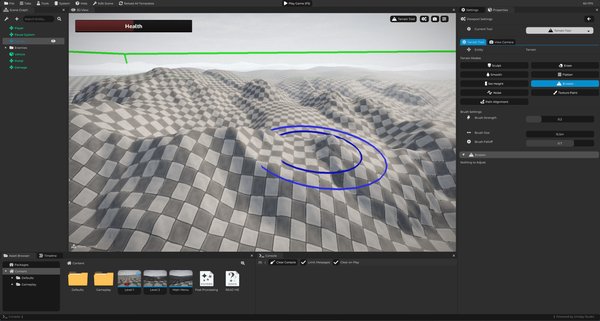
Now You Can UNDO! (Ctrl + Z)
Yes, you can now FINALLY undo your sculpting (or anything else) you do to your terrain using the Terrain Tool. This is a great quality-of-life feature.
Terrain Rendering Optimizations
I managed to reduce the number of draw calls used by the engine to render the entire terrain by around 100 times, bringing it much closer to the theoretical minimum. I've also improved internal systems to further optimize terrain rendering. Expect better performance here.
New Path Alignment Mode
As mentioned earlier, the path system received a lot of improvements in this version. This also affected the terrain system because now you have a new path alignment mode that allows you to select a path in your scene and use it to terraform the terrain. This is great for creating roads and similar features.
Better Heightmap Generation
The default heightmap generation used to be very mediocre, so now we've tweaked it to generate more interesting landscapes. We've also fixed an issue where every generated terrain would use the same seed, meaning they always looked identical.
This is no longer the case, and you can now set the random seed through code. This will also update the terrain generation seeds accordingly.
New Terrain Raycasting Method
Given an origin and a target position, you can call the terrain component to raycast and check if it collides with the terrain, returning the collision position and normal if it does.
Rendering Performance Improvements
A lot of work has been done on internal OpenGL caching systems to reduce driver overhead. Cave Engine already had extensive caching and systems to reduce driver overhead, but now this has been taken to another level.
In some cases, I was able to benchmark a reduction of almost a thousand times the amount of driver overhead we previously had. This ultimately depends on your machine, but if you were driver-overhead bound before, there's a good chance you will see significant performance improvements in this version.
New internal optimizations include:
- Shader program binding cache
- Uniform value caching
- Cache invalidation logic
These changes reduce redundant OpenGL calls and improve rendering performance.
Additionally:
- Uniform binding safety improvements
- Possible workaround for AMD depth clearing issues
Linux Version Fixes
I've also fixed the countless Python path issues that some Linux users were experiencing when using the engine, especially when creating a new project.
New Python APIs
With most of the features mentioned above, new Python APIs were added or updated to support them, but there is much more. I will list a few here.
VehicleComponent.SetSteering(...)
Mesh.AddMeshAsLod(...)
PathComponent.GenerateProceduralMesh(...)
PathComponent.GetSampleAdvance(...)
PathEdge.GetPointA()
PathEdge.GetPointB()
Transform.AlignAxis(...)
New options for VSync and FPS limits were also added. Check the Python stubs to see everything that is new.
More cave.ui APIs and Better Tool Development
If you like or need to write custom tools for the editor to help you build your games or assist during development, your life just got better. You can now check the API stubs from our cave.ui code and expect a more stable editor tooling experience. Debug tabs are now reloaded when the game reloads.
Bug Fixes
The following fixes were included in this release:
- Fixed Linux export issues
- Fixed Linux crash caused by incorrect Python path
- Fixed terrain heightmap always generating the same result
- Fixed template reload recursion crash
- Fixed black thumbnails when manual exposure was used
- Fixed incorrect default DebugTab code
- Fixed CodeEditor not editable when string was empty
- Fixed animated meshes having incorrect AABB bounds
- Fixed terrain chunk culling errors
- Fixed missing StateMachine component references
- Fixed various editor UI typos
- Fixed documentation typos
- Fixed EntityMap crash
- Fixed CodeEditor string highlighting issues
- Fixed CodeEditor comment highlighting after strings
- Fixed clipboard copy implementation not using SDL
Known Issues
We have some known issues worth mentioning. The reason they are not fixed yet is either because they are low priority or because we have not been able to reproduce them consistently. If you have any hints about them, please let me know in our Discord server.
- Cave doesn't work on some (or most) Wayland Linux systems (only X11 is supported at the moment).
- Sometimes a terrain chunk disappears depending on the camera angle (a false-positive culling issue). It's a very rare glitch and I haven't been able to reproduce it yet.