
Welcome to Cave Engine 1.6.2 release notes! This one is short since it's mostly a bug fixing and quality of life improvement, but it does introduce a couple of new features that will help you create your games. So let's dive into it.
If you are not aware of it, Cave Engine is definitely the easiest and fastest game engine for indie developers, hobbyists, Python programmers, or a small team looking for a way to create 3D video games. You can learn more about by Clicking Here.
Different Link Styles for the Logic Bricks
If you're not a fan of the traditional "Bezier-like" logic brick link styles, you can change it to be straight lines, manhattan style or even metro style (45 degree curves):
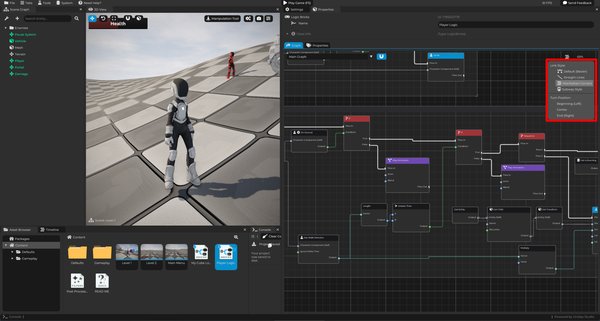
You decide it. This is a visual only thing, so it won't affect how Logic Bricks are executed, but may help you organize your logic.
Custom Executable Icons
If you're exporting your game for Windows, now you can natively select a texture to be used as the .exe icon:
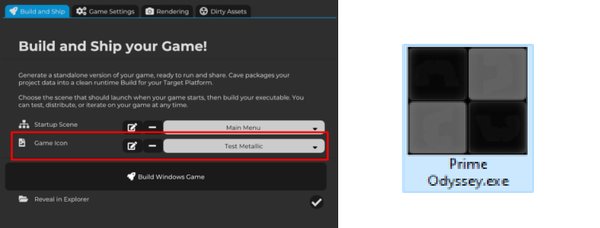
This option is available next to the "Build Windows Game" button.
New Built in Progress Bar for the Editor
Previously the progress bars were handled as either a different thread or a different window. This was causing all sorts of weird corner cases, not to mention that it was ugly.
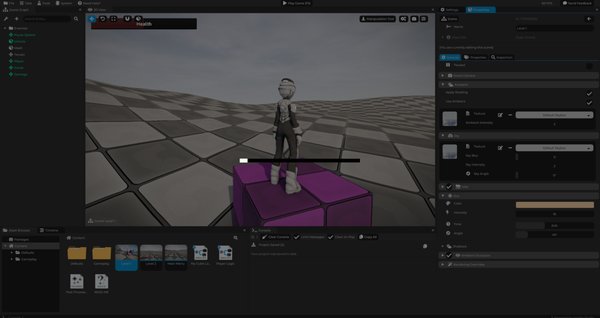
Now when you're loading your game, saving it or importing assets, the progress bar will appear in the main Editor Window and Process.
Explained the Property Behavior
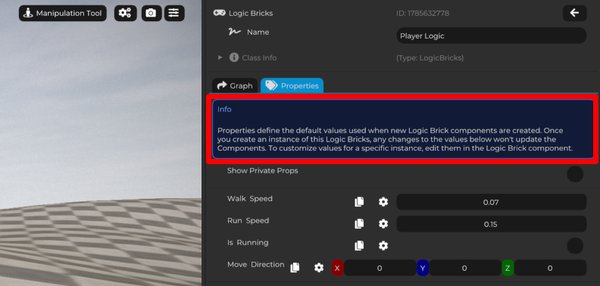
Assets such as the Logic Bricks and also the root Entity of a Template allows you to define custom Properties that are later on initialized for each instance of that given asset. This was causing a lot of confusion among the users regarding how they work, with many users mistakenly reporting this as a bug:
"If I change a property value in the Logic Brick, it does not update in the Logic Brick Component"
That's not a bug, but due to the fact that the value of those Properties are the initial value for when they're initialized, not the final one. To make it clear, I added an Info Text explaining it:
Actual behavior: Properties define the default values used when new Logic Brick components are created. Once you create an instance of this Logic Bricks, any changes to the values below won't update the Components. To customize values for a specific instance, edit them in the Logic Brick component.
Fixes:
- Fix: OpenGL Stale State Crashes (very important fix)
- Fix: ui::InputTextOnly(...) was unsafe on Linux
- Fix: Asset Browser Flickering on Linux
- Fix: RenderGraph::Remove(...) was not handling Null Entity corner case
- Fix: MeshComponent was causing a memory violation on RenderGraph
- Fix: Dialogs Windows were not working on some Linux Distros
- Added more Tracing code to Detect Logic Brick Component Issues in the Future