Cave: Getting Started Guide
Python Scripting Basics
Lesson 15 of 19 • 50 XP
Keep your place in this quest
Log in or sign up for free to subscribe, follow lesson progress, and access more learning content.
Now that you have seen how characters and animation work in Cave, let's take a step back and understand the scripting system that usually connects everything together: Python.
Python is used in Cave to write gameplay behavior, editor tools, UI callbacks, animation callbacks, timeline events, and small bits of custom logic that would be too specific to exist as a built-in component. You do not need to become an advanced Python programmer before using Cave, but it is very useful to understand the basic shape of a Cave script.
In this lesson, you will learn:
- What Python is used for in Cave.
- How Python Script assets and Python Components work together.
- What
start()andupdate()do. - How to access the current entity from a script.
- How to get components from an entity.
- When to use a Python Component or a Python Code Component.
The goal is not to teach the whole Python language. The goal is to make Cave scripts feel understandable when you open them.
Where to Learn Python?
If you don't know how to code in Python, Uniday Studio actually provides free learning quests on Python as well. Go to uniday.studio/learn to see all the options or start here:
For this section, we will assume that you already have an understanding on the topics handled in those two learn quests.
What Python Is Used For in Cave
In Cave, Python is the scripting layer you use when a game object needs behavior.
For example, Python can be used to:
- Move a player or enemy.
- Open a door.
- Play an animation.
- Trigger a sound.
- Start a timeline.
- Change scenes.
- Update a UI element.
- Create custom editor tools.
Basically, you can write Python Scripts to create all the logic of your game.
This is why the startup project already contains Python scripts. The default player, for example, is not just a mesh with an animation. It also has gameplay logic that reads input, moves the character, rotates the mesh, and plays the correct animation.
So, when you write Python in Cave, you are usually not writing isolated code. You are writing logic that controls an entity and talks to the components attached to that entity.
Script Assets and Python Components
Python code usually lives inside a Python Script asset.
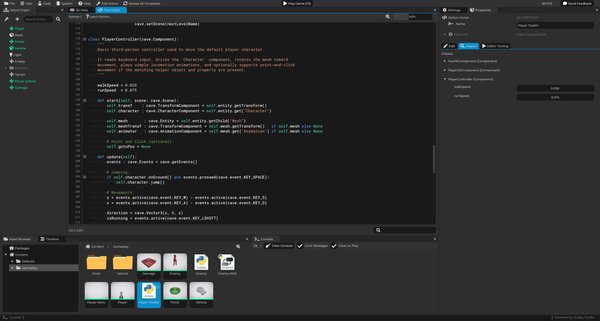
Then, to make that script run in a scene, you add a Python Component to an entity and choose which class from the script should be executed.
Think of it like this:
| Part | What It Does |
|---|---|
| Python Script asset | Stores the code. |
| Python Component | Runs a class from that script on an entity. |
| Entity | The object being controlled by the script. |
cave.Component class |
The actual behavior you wrote. |
For example, you may have a script asset called Door Controller. Inside it, you may have a class called DoorController. that inherits from cave.Component. Then you add a Python Component to your door entity and select that class.
This separation is important because the same script can be reused. You can place many doors in the scene, each one using the same door controller script, but with different properties or different child objects.
A Minimal Cave Component
A basic Cave Python component looks like this:
import cave

class MyComponent(cave.Component):
    def start(self, scene):
        print("The component started!")

    def update(self):
        pass
There are a few important details here:
import cavegives your script access to Cave's Python API.class MyComponent(cave.Component)creates a component class that Cave can run.start(self, scene)runs when the component starts.update(self)runs every frame while the component is active.
The name MyComponent can be anything you want, but in real projects you should use a clear name like DoorController, EnemyAI, Checkpoint, or PlayerHealth.
Lifecycle Methods
Cave calls some methods automatically when your component is running.
The most common ones are:
| Method | When It Runs | Common Use |
|---|---|---|
start(self, scene) |
When the component starts. | Get references, read properties, prepare variables. |
firstUpdate(self) |
Always after every Entity Component's start method, in the first update. | Create variables that depends on other components to have been initialized. |
update(self) |
Every frame, if scene is not paused. | Movement, input, timers, state checks. |
pausedUpdate(self) |
Every frame, if Scene IS paused. | Paused logic. |
end(self, scene) |
When the component ends. | Clean up if needed. |
Most beginner scripts use start() and update(). For example, if you are creating a moving platform, start() is a good place to store the original position, and update() is where you move the platform every frame.
We also have the editorUpdate and lateUpdate methods, but we'll not explore them here since they're a bit more advanced.
Accessing the Current Entity
Inside a Cave component, self.entity is the entity that owns the Python Component.
This is one of the most important ideas in Cave scripting. The script does not float around the scene by itself. It belongs to an entity.
Here is a simple example:
import cave

class DoorController(cave.Component):
    def start(self, scene):
        self.transform = self.entity.getTransform()
        self.isOpen = False

    def update(self):
        pass
In this script:
self.entityis the door entity.self.entity.getTransform()gets the door's Transform Component.self.isOpenis a variable used by the script to remember whether the door is open.
You will use this pattern all the time. First you get the entity, then you get the components or child entities you need, and then you use them in your logic.
Getting Other Components
To control an entity, you usually need to get one or more components from it.
For example, a player script may get:
- The
Transformcomponent to move or rotate the entity. - The
Charactercomponent to handle character movement. - The
Animationcomponent from a child mesh entity to play animations. - The
Audiocomponent to play a looping sound.
Here is a small example:
import cave

class SimpleMover(cave.Component):
    def start(self, scene):
        self.transform = self.entity.getTransform()
        self.speed = 2.0

    def update(self):
        self.transform.move(0, 0, self.speed * cave.getDeltaTime(), local=True)
This moves the entity forward every frame.
The important part is cave.getDeltaTime(). Since update() runs every frame, multiplying movement by delta time keeps the movement speed consistent even if the frame rate changes.
Reading Custom Properties
Hardcoding values is fine for a first test, but editable properties are usually better for real game objects.
For example, instead of writing this:
self.speed = 2.0
You can read the value from the entity properties:
self.speed = self.entity.properties.get("speed", 2.0)
This means:
- If the entity has a
speedproperty, use it. - If it does not, use
2.0as the default value.
This is very useful for reusable scripts. You can create one SimpleMover script and use it on several entities, each with a different speed.
For example:
| Entity | speed Property |
|---|---|
| Slow Platform | 1.0 |
| Fast Platform | 4.0 |
| Moving Hazard | 7.0 |
The script stays the same, but the behavior changes per entity.
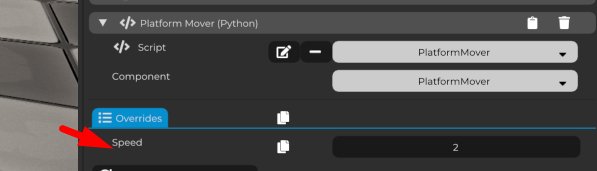
Alternatively, you can create locally modifiable variables for the Component iself instead of relying on the Entity's properties. When you create a variable like this:
import cave

class PlatformMover(cave.Component):
    # This will be local:
    speed = 2.0

    def start(self, scene: cave.Scene):
        pass

    def update(self):
        events = cave.getEvents()
The speed variable will be locally modifiable for every component instance:
Getting Child Entities
Many Cave objects are built as small hierarchies.
The player template is a good example. The root Player entity has the character physics and logic, while the child Mesh entity has the visual character mesh and Animation Component.
So, if a script on the root player entity wants to play animations, it first gets the child mesh entity:
import cave

class PlayerAnimationExample(cave.Component):
    def start(self, scene):
        self.mesh = self.entity.getChild("Mesh")
        self.animator = self.mesh.get("Animation")

    def update(self):
        self.animator.playByName("p-idle", blend=0.2, loop=True)
This is the same kind of pattern used by the default player controller:
- Get the child entity.
- Get the component from that child.
- Use the component when needed.
Once you understand that pattern, many Cave scripts become much easier to read.
The getChild method has an optional "recursive" parameter, default to True. If True, it will query all the Entity children, including children of children, until it finds the Entity you requested by name.
Getting Scene Entities (Scene Queries)
When creating a game, it is very likely for you to need to get other entities in the scene. So let's explore that. The first step is to get the scene itself, and in Cave, you have two ways of doing it:
# Returns the active scene:
scene = cave.getScene()

# Returns the scene the entity belongs to:
scene = self.entity.getScene()
For convenience, the cave.Component's start and end methods also receive the scene as a parameter, since it's very likely that you'll use them in those methods. For local code such as the Python Code Component, there is also a scene variable defined for you by default that you can magically "just use it" and expect it to work.
Once you get the scene, you can get a specific Entity by its name using the following code:
watchtower = scene.get("Watch Tower 01")
Cave provides a lot of other methods in the scene class for you to do other scene queries. You can do ray casts, sphere casts, check a contact box or sphere for basically collision queries, or even get all the entities, all the root entities, all the entities with a specific tag, all the entities with a specific properties, or with a specific name, etc. So it's worth checking the Python API for more details.
Always remember to check if your query returned somethind valid. For example:
# Querying a non existent Entity:
ent = scene.get("This Entity Doesnt Exist")

if ent is None:
    print("Invalid Entity!")
Getting Entity Components
Once you have a specific entity and you check if it's not known, it is a good idea to understand how you can get specific components from it.
The entity does have a specific method called get that you can pass the name of the component as a string and it will automatically carry the entity to see if there is a component that matches your search:
animator = self.entity.get("Animation Component")
To make your life easier, if a component name ends with the word "Component", which is very common, you can completely omit this ending when typing the component name in this method. You can also choose if you want to include white space into multi-word component names or put everything together.
For example, if you want to get the Rigid Body Component from an Entity, even though his Python name is RigidBodyComponent, all the options below will work:
rb = self.entity.get("Rigid Body")
rb = self.entity.get("RigidBody")
rb = self.entity.get("Rigid Body Component")
rb = self.entity.get("RigidBodyComponent")
rb = self.entity.get("RigidBody Component")
Since Python is not heavily typed, it is a good programming practice in Cave that you provide a type hint for the components type, which can be done in a way below. Also notice that in this case, you do need to include the full component name, since it is a Python semantic:
rb : cave.RigidBodyComponent = self.entity.get("Rigid Body")
This allows IntelliSense to work in external editors such as Visual Studio Code or even the built-in autocomplete that Cave Engine provides for you in its embedded script editor.
For the Transform Component, since it is one of the most common component types and you'll be querying it a lot, the Entity have a native method to get its major Transform:
transf = self.entity.getTransform()
Getting it by calling self.entity.getTransform() provides the same result as getting it by calling self.entity.get("Transform"), but the first option is faster and more optimized.
if an entity have multiple components with that same type, it will return the first match, but sometimes you may want to have all the matches. For example, in a multi-material mesh that in cave will be represented by an entity with multiple mesh components, you may want to get all the mesh components. And for that, you can use the getAll method:
meshCmps = self.entity.getAll("Mesh")

# Changing all the materials to a glowing one:
for meshCmp in meshCmps:
    meshCmp.material.setAsset("Glowing Material")
Getting Entity Python Components
Now we know how to get native Cave Components, but what if you want to get from an Entity a component that was customly written by you using Python?
For that, you need a special method called getPy, and it works the exact same way as the regular get method, except that this one will also return Python components:
myCmp = self.entity.getPy("MyCustomComponent")
It requires a special method due to internal optimizations to make sure Cave runs as fast as possible.
Once you have your custom Python Component, you can freely access its python made variables and methods:
myCmp = self.entity.getPy("MyCustomComponent")

# Changing python variables:
myCmp.customValue = 10

# Calling custom methods:
myCmp.doSomething()
myCmp.applyDamage(10)
Python Code Component
Besides the regular Python Component, Cave also has a Python Code Component. The Python Code Component is useful for quick scripts written directly on the entity, without creating a separate Python Script asset first.
It does have all the other methods, and the difference is that in the Python code component, you write the Python script directly inside the component itself, and it is not modular and not reusable. So if you create a copy of the entity, it will also create a copy of the script in it. But sometimes, this can be a faster way to create some simple logic, like a coin rotating.
It is good for:
- Quick tests.
- Tiny callbacks.
- One-off behavior.
- Prototypes.
It is not the best option for larger gameplay systems because the code is harder to reuse and organize, but it's optimal for tiny codes.
Python Component vs Python Code Component
Use this as a simple rule:
| Use This | When |
|---|---|
| Python Component | The behavior should be reused, edited as an asset, or grow over time. |
| Python Code Component | The behavior is small, local. |
For example, a reusable EnemyAI should be a Python Script asset used by a Python Component. A tiny code that prints something or calls a function when a button is pressed can be a Python Code Component.
A Good First Script Goal
A good first Cave script is something small and visible.
Try building one of these:
- A platform that moves forward.
- A door that opens when the scene starts.
- A light that turns on and off every few seconds.
- A pickup that plays a sound and disables itself.
- A button that changes to another scene.
These examples are small, but they teach the most important workflow: get the entity, get the component, change something, test in Play Mode, and adjust.
What You Should Remember
Python scripts in Cave are usually attached to entities through Python Components.
The most important beginner pattern is:
- Use
start()to get references and prepare values. - Use
update()to run behavior every frame. - Use
self.entityto access the entity that owns the script. - Use components to actually move, animate, play sound, or control the object.
Once this pattern feels natural, scripting in Cave becomes much less mysterious. You are not just writing code. You are teaching entities how to behave.