Cave: Getting Started Guide
Hierarchical State Machines
Lesson 17 of 19 • 25 XP
Keep your place in this quest
Log in or sign up for free to subscribe, follow lesson progress, and access more learning content.
As your gameplay grows, you will eventually need objects that behave differently depending on what they are currently doing. An enemy can be idle, patrolling, chasing, attacking, stunned, or dead. A door can be closed, opening, open, or locked. A boss fight can move through several phases.
This is where State Machines become useful.
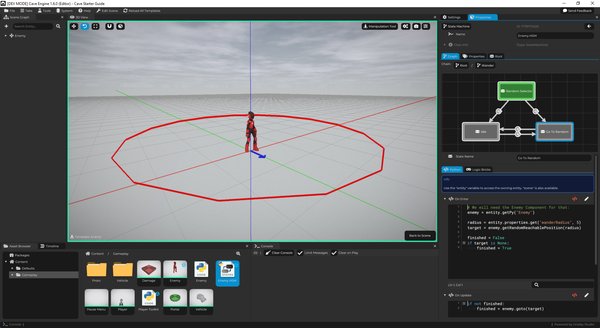
In the image above, you can see the default enemy that Crave creates for the new project, with its State Machine open to the right side. We are inside the "wander" state that do have inner states, such as the "random selector" (the initial state, represented by the green color), the "go to random" and the "idle". You can see the transitions between the states represented by the arrows, and that each state can have its own logic, either in Python, as shown in the image, or in logic bricks.
A state machine helps you organize behavior into clear states instead of writing one large script full of unrelated conditions.
In this lesson, you will learn:
- What a State is.
- What a Transition is.
- Why hierarchical state machines are useful.
- How Cave's State Machine Component fits into an entity.
- How
On Enter,On Update, andOn Exitwork. - How Python and Logic Bricks can be used inside states and transitions.
The goal is to understand the mental model first. Once that makes sense, the editor becomes much easier to use.
What Is a State?
A state describes what an object is currently doing.
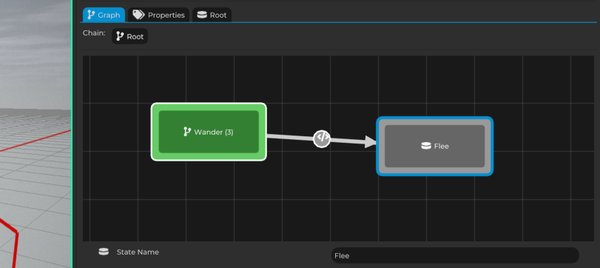
For example, an enemy might have these states:
IdlePatrolChaseAttackDead
Only one of those states should usually control the enemy at a time. If the enemy is in Patrol, it should not also be running the attack behavior. If it is in Dead, it should not keep chasing the player.
This makes gameplay easier to reason about because each state has a clear job.
| State | What It Might Do |
|---|---|
Idle |
Stand still and wait. |
Patrol |
Move between points. |
Chase |
Move toward the player. |
Attack |
Play an attack animation and deal damage. |
Dead |
Disable movement and play a death animation. |
Instead of asking "what should the enemy do this frame?" from one huge script, you can ask "which state is the enemy currently in?"
What Is a Transition?
A transition is the rule that moves the state machine from one state to another.
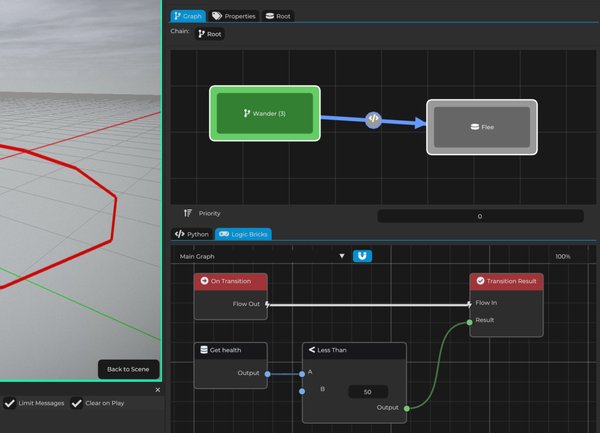
For example:
IdletoPatrolwhen the enemy should start moving, after a timer.PatroltoChasewhen the player is detected.ChasetoAttackwhen the enemy is close enough.AttacktoChasewhen the attack finishes.- Any state to
Deadwhen health reaches zero.
The transition is not the behavior itself. It is the decision that says, "now we should change state."
That separation is important. The Attack state can focus on attacking, while the transition decides when it is time to enter or leave that state.
Why Hierarchical State Machines Help
Cave uses a hierarchical state machine approach. This means states can be organized inside other states. That is useful because many behaviors share a common parent idea.
For example, an enemy could be organized like this:
Alive
    Idle
    Patrol
    Chase
    Attack
Dead
The Idle, Patrol, Chase, and Attack states all belong to the broader Alive state. This makes the structure easier to understand and can help you avoid repeating the same logic in several places.
For a beginner project, you can start with a simple flat state machine. But as your gameplay gets more complex, hierarchy helps keep the logic clean.
The State Machine Component
To use a state machine in a scene, an entity needs a State Machine Component.
The component connects the entity to a State Machine asset. The asset defines the states, transitions, and logic, while the component runs that logic on the entity during gameplay.
This is similar to other Cave systems:
| Asset | Component |
|---|---|
| Python Script | Python Component runs it. |
| Animation | Animation Component plays it. |
| State Machine | State Machine Component runs it. |
In practice, this means your enemy entity can have a State Machine Component, and that component can run an enemy AI state machine.
A state machine asset can have properties, as you can see by going to the properties tab, and those properties can be locally changed in the state machine component, allowing you to create modular state machines that have different settings across different types of entities.
State Events
Each state can react to three important moments:
| Event | When It Runs | Common Use |
|---|---|---|
On Enter |
When the state starts. | Reset timers, initialize variables, play an animation, choose a target. |
On Update |
While the state is active. | Move, check distances, update timers. |
On Exit |
When leaving the state. | Stop effects, clear temporary values. |
For example, an Attack state might work like this:
On Enter: play the attack animation.On Update: wait for the hit moment or animation callback.On Exit: clear the attack flag.
This makes each state feel like a small self-contained behavior.
Python Inside States
State machines can use Python for logic.
Inside each State's Python code, Cave provides useful variables such as entity and scene, so the state can control the entity that owns the State Machine Component.
For example, a state could play a sound when entered:
cave.playSound("Enemy Alert", volume=0.8)
Or it could read a property from the entity:
health = entity.properties.get("health", 100)
This keeps state logic close to the behavior it belongs to.
Python Inside Transitions
Transitions can also use Python. For transition Python logic, Cave uses a variable called result. If result becomes True, the transition can happen. For example, a transition to a Dead state could check health like this:
health = entity.properties.get("health", 100)
result = health <= 0
A transition from Chase to Attack could check distance if your enemy script or properties provide that value:
player = scene.get("Player")
playerPos = player.getTransform().getWorldPosition()
entityPos = entity.getTransform().getWorldPosition()

distanceToPlayer = (playerPos - entityPos).length()
result = distanceToPlayer < 2.0
The exact data depends on your game, but the idea is always the same: the transition decides whether it is time to move from one state to another.
TIP: During a transition, all the local variables defined in the state where the transition is coming from are available for you. So in the previous example, where we calculated the distance between the entity and the player, we could store the player transform and the entity transform on two variables at the on-enter state of the state this transition is coming from to save a little bit of resources, since it's then cached and we would no longer need to get this data every frame.
Logic Bricks Inside State Machines
State machines can also use Logic Bricks.
This is useful when you want to build behavior visually instead of writing Python code. For many gameplay tasks, Logic Bricks are a very approachable way to connect events, conditions, and actions.
They work in the exact same way as explained above for the Python code inside the state or for a transition. The State's Logic Bricks and the Transition's Logic Bricks are already initialized with the bricks you need to get started.
You can mix Python and Logic Bricks depending on what feels clearer for the behavior you are building. If a State or Transition has both, then both will be executed and the transition will occur if one OR the other happens.
When to Use a State Machine
Use a state machine when an object has clear modes of behavior.
Good examples include:
- Enemy AI.
- Boss phases.
- Doors and interactable objects.
- Mission or quest flow.
- Cutscene progression.
- Character ability states.
You may not need a state machine for tiny one-action objects. If a pickup only plays a sound and disappears, a small Python script or Logic Brick setup may be enough.
What You Should Remember
A state machine organizes gameplay into states and transitions.
States describe what is currently happening. Transitions decide when to switch to something else. On Enter, On Update, and On Exit help keep each state focused and readable.
For simple behavior, a script may be enough. For behavior with multiple modes, a state machine usually makes the logic easier to understand and easier to expand.