Cave: Getting Started Guide
Logic Bricks Basics
Lesson 14 of 19 • 10 XP
Keep your place in this quest
Log in or sign up for free to subscribe, follow lesson progress, and access more learning content.
Logic Bricks are Cave's visual scripting system.
They let you create gameplay behavior by connecting nodes instead of writing Python code directly.
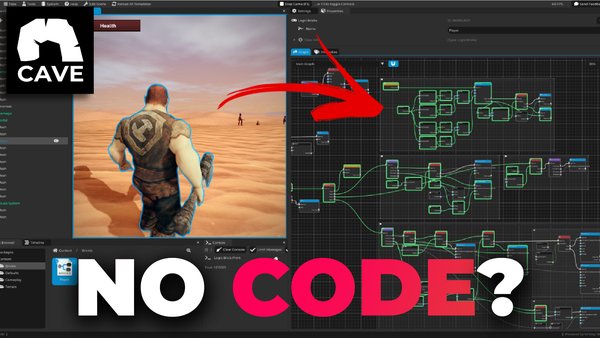
This lesson introduces what Logic Bricks are, where they live, how they run, and when you should use them. You will learn the full system in deeper lessons later, but this overview will help you understand where Logic Bricks fit in the Cave workflow.
Video Tutorial
We have a complete Video Tutorial on how to get started with logic bricks. We recommend that you watch it.
Watch on YouTube
It will be a much better approach for learning them in depth.
But if you want to continue here, then let's do a quick introduction:
What Are Logic Bricks?
Logic Bricks are visual logic graphs that allows you to quickly create logic visually, without writing actual code.
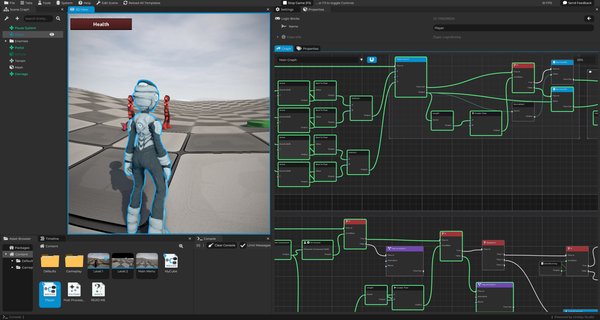
If you're familiar with other visual scripting approaches such as Unreal Engine's Blueprints, each brick is essentially a node. But for Cave's naming conventions, they're called Bricks. Bricks can represent many kinds of logic:
- Events.
- Actions.
- Values.
- Math.
- Strings.
- Engine utilities.
- Entity operations.
- Component operations.
- Asset references.
- Functions.
You build behavior by connecting bricks together.
If you are new to programming, Logic Bricks can be a friendly way to start creating interactions because you can see the behavior as a graph.
For example, a simple graph could mean:
When the player touches this trigger:
  Open a door.
  Play a sound.
  Disable the trigger.
That kind of interaction is often easier to understand visually than as a long script when you are still learning.
This Is Not the Full Logic Bricks Course
This lesson is only an overview.
Logic Bricks can go much deeper than this:
- Functions.
- Flow control.
- Value sockets.
- Runtime debugging.
- Comments.
- Asset handler bricks.
- Reusable graphs.
- State Machine integration.
Those topics deserve focused lessons later.
For now, the goal is to understand the role of Logic Bricks: they are a visual way to build behavior, connect systems, prototype interactions, and make game objects respond to events.
If you want a full logic brick tutorial, please watch this.
Logic Brick Assets
A Logic Bricks graph is an asset. You create it in the Asset Browser, just like you create scenes, Python scripts, timelines, materials, or entity templates.
Because it is an asset, it can be:
- Named.
- Organized in folders.
- Selected in the Asset Browser.
- Edited in the Properties tab.
- Reused by multiple entities.
- Saved with the project.
This is important: the graph itself is project content.
For example, you might create a Door Logic asset and use it on several doors. Later, if you improve the graph, those doors can share the updated behavior depending on how you structure the reusable setup.
Logic Bricks Component
To run a Logic Bricks asset in the game, attach it to an entity with a Logic Bricks Component.
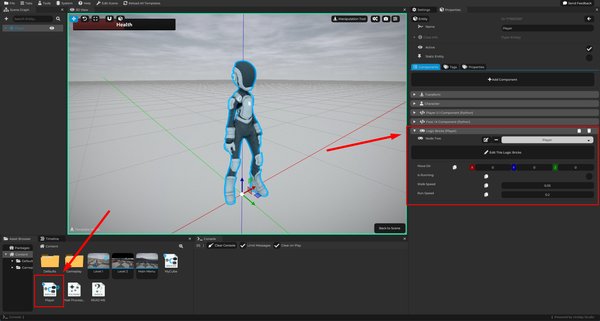
The component chooses which Logic Bricks asset it should use. At runtime, the component creates a runtime instance of the graph for its owning entity.
That means:
- The asset defines the shared behavior.
- Each entity gets its own running instance.
- The same graph can be reused by multiple entities.
This is similar to how a reusable Python script can run separately on many entities.
Reusable Logic Bricks
Logic Bricks are reusable, and that is one of their biggest strengths.
For example, you could create one Logic Bricks asset called Open Door. Then several door entities could use that same graph.
Reusable logic works well when:
- Many objects share the same behavior.
- Each object needs slightly different local values.
- You want to improve the behavior in one place.
- You want the project to stay organized.
This is similar to how:
| Reusable Asset | Reused By |
|---|---|
| Python Script | Python Components. |
| Entity Template | Scene instances. |
| Material | Mesh entities. |
| Logic Bricks | Logic Bricks Components. |
Instead of copying the same graph into many places, you keep one behavior asset and configure each entity as needed.
Logic Brick Properties
Logic Bricks can expose properties.
Those properties are synchronized into the Logic Bricks Component, where they can be overridden locally.
For example, a reusable damage graph could expose:
- Max Health.
- Damage amount.
- Damage cooldown.
- Target tag.
- Whether it destroys the object after triggering.
Then each entity using the graph can have different values.
One spike trap can deal low damage, while a lava volume can use the same logic with much higher damage.
Flow Events
Logic usually starts from events.
Common flow events include:
| Event | When It Runs |
|---|---|
On Start |
When the logic begins. |
On First Update |
On the first update after starting. |
On Update |
Repeatedly while the game updates. |
On Paused Update |
While paused updates are allowed. |
On Late Update |
Later in the update cycle. |
On End |
When the logic is ending. |
Events are the entry points of the graph.
Without an event or some other trigger, the graph has no reason to start doing work.
Logic Flow
Logic flow decides what happens and in what order. Flow sockets connect event and action bricks.
For example:
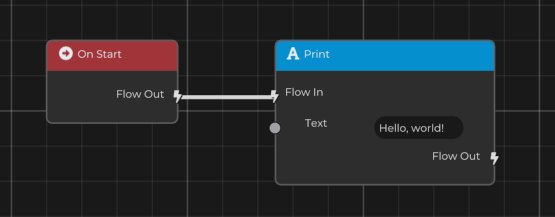
That means the print action happens when the graph starts.
The important beginner distinction is:
| Connection Type | Purpose |
|---|---|
| Flow connections | Define when actions run. |
| Value connections | Provide data to those actions. |
Once that clicks, Logic Bricks become much easier to read.
More complex graphs can branch, delay, schedule, call functions, read values, modify entities, and communicate with components.
Runtime Debugging
Logic Bricks can show useful runtime feedback while testing.
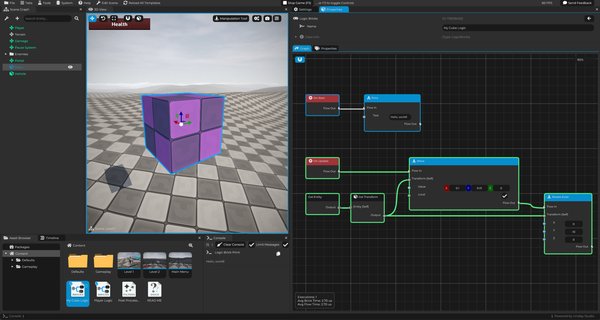
When the owning entity is selected during Play Mode, executed bricks and links can be highlighted so you can see what ran:
Runtime debugging can help answer questions like:
- Did the event run?
- Did the condition pass?
- Did the action execute?
- Did the graph reach the correct object?
- Was an error printed to the Console?
If a door did not open, this feedback helps you inspect whether the trigger event ran, whether the condition passed, and whether the action reached the door.
When you select a logic brick after testing the game, it also shows in the bottom left corner of the screen how many times it got executed and the average time of execution.
Logic Bricks in State Machines
Logic Bricks are not only used as standalone components. They can also be used inside State Machines.
For example:
- A State Machine state can use Logic Bricks for its behavior.
- A transition can use Logic Bricks for its condition.
State Machines are explained later, but it is useful to know that Logic Bricks can be part of larger structured behavior systems.
This means you can use visual logic for simple interactions and also for organized behaviors like enemy states.
When to Use Logic Bricks
Logic Bricks are a good fit for:
- Beginners learning gameplay logic.
- Designers who prefer visual logic.
- Quick prototypes.
- Simple interactions.
- Triggers.
- UI behavior.
- Reusable gameplay events.
- Connecting systems together.
Good beginner examples include:
- A pressure plate opening a door.
- A pickup increasing health.
- A trigger starting a Timeline.
- A UI button changing scenes.
- A hazard damaging the player.
- A checkpoint saving a position.
For very large or complex systems, Python may be easier to organize. For many gameplay interactions, Logic Bricks are fast, visual, and easy to inspect.
A Simple Rule
Kave engines visual scripting has a one-to-one parity with the Python API, meaning that every function available through code should also be available through logic bricks as well. It means that you can freely choose which one you prefer to create the logic of your game. Meaning:
- Use Logic Bricks when you want to see the behavior as a graph.
- Use Python when the behavior is easier to express as code.
- You can also combine both!
Both approaches are part of Cave, and many projects use visual logic for some systems and Python for others.