Stove: Fast 3D Modeling Software for Game Assets
Creating 3D assets for a game shouldn't always require a large production workflow. If you're making a low-poly prop, a retro vehicle, a hand-painted building, or a simple environment asset, you usually want to model it, texture it, export it, and continue working on your game.
That's exactly what Stove was built for. Stove is a lightweight 3D modeling and texture-painting application focused specifically on fast game asset creation, especially for low-poly, stylized, retro, and hand-painted 3D graphics.
Instead of trying to cover every possible type of 3D production, Stove keeps the workflow small and focused. You create the geometry, paint the asset directly in 3D, and export the finished result to use inside your game engine.
A 3D Modeling Tool Built for Game Assets
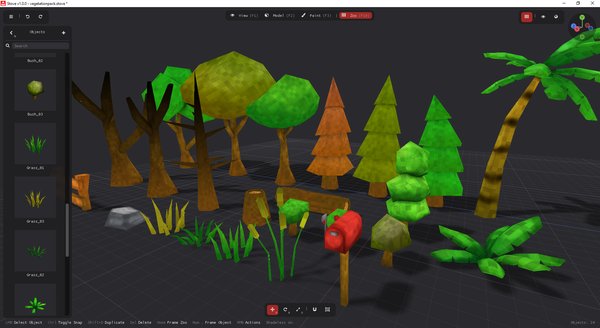
Stove is designed around the assets that game developers create all the time. You can use it for props, weapons, furniture, vegetation, rocks, buildings, vehicles, simple static characters, and many other individual pieces that eventually compose a complete game world.
This focus is especially useful when you're creating an entire asset pack, because speed starts to matter much more once you need dozens or hundreds of models. Instead of spending time configuring workflows that aren't relevant to the asset, Stove keeps you close to the actual model throughout the process.
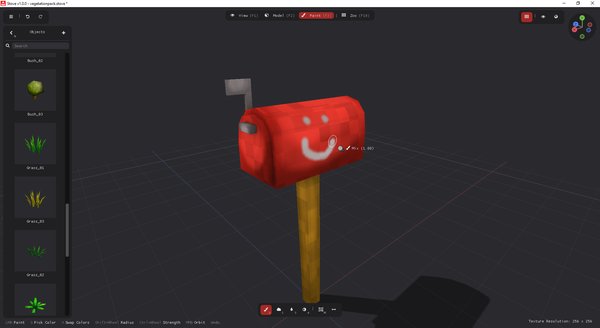
Some of the styles Stove is particularly well suited for include:
- Low-poly 3D graphics
- PS1 and retro-inspired game assets
- Stylized and cartoon graphics
- Hand-painted models
- Simple indie game assets
- Game jam assets and fast prototypes
The basic workflow can be summarized as Model, Paint, Export. You can start from a primitive or import an OBJ model, edit it, texture it, and then export the finished asset as OBJ.
Three Modes Keep the Workflow Simple
The main Stove interface is divided into three modes: View, Model, and Paint. Each one has a clear purpose, so you can quickly move between creating the model, texturing it, and inspecting the final result.
Model Mode
Model Mode is where you create and edit the geometry. Stove uses familiar polygon modeling concepts, including vertices, edges, and faces, so if you've already used another 3D modeling application, the fundamental workflow should feel familiar.
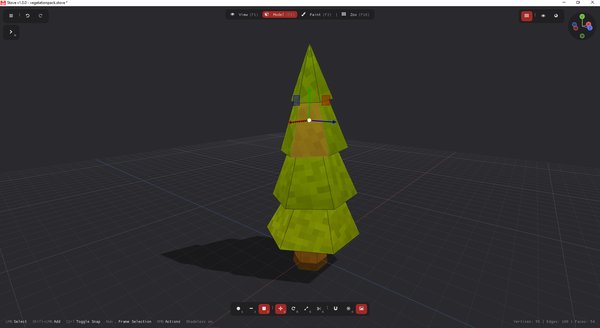
The tools are focused on the operations you need to create game assets rather than on building a massive general-purpose 3D environment. This makes it easier to quickly create a shape, refine it, and move on to texturing.
Paint Mode
Once the geometry is ready, you can switch directly to Paint Mode and paint on the 3D model itself. This is particularly useful for stylized, retro, and hand-painted assets, where the texture often contributes just as much to the final look as the geometry.
Most importantly, you don't need to manually create or manage a UV map. Stove generates the UVs automatically, which removes one of the extra steps normally found between modeling and texture painting.
You simply finish the model and start painting it.
View Mode
View Mode gives you a clean way to inspect the finished asset without modeling selections, vertices, edges, or editing overlays getting in the way. It lets you focus on how the actual asset looks before exporting it or moving on to the next model.
Because all three modes are part of the same focused workflow, you can quickly move back and forth whenever something needs adjustment. If you notice a problem while painting or inspecting the asset, you can return to Model Mode, fix it, and continue.
No Manual UV Mapping Required
Automatic UV generation is one of the main ideas behind Stove. Traditional 3D workflows often require you to stop modeling, create seams, unwrap the mesh, organize the UV islands, and then prepare the model for texturing.
Stove handles that process automatically. You still get a textured model with UV coordinates when you export it, but you don't need to spend your time manually working with the UV layout during normal asset creation.
For game developers, this can make the entire workflow feel much more immediate. You can focus on the shape and appearance of the asset instead of the technical preparation required between those two stages.
Keep Multiple Assets Together With the Asset Zoo
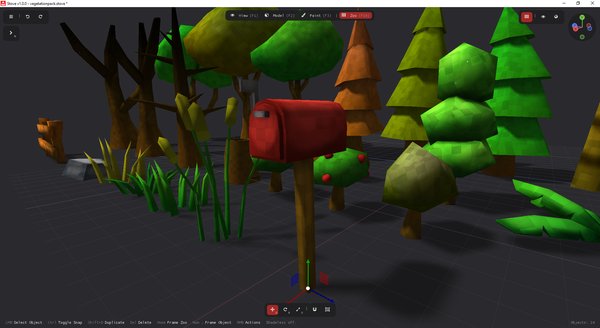
Most games need more than one model, so Stove projects can contain multiple independent assets. When your collection starts growing, the Asset Zoo gives you a place to see those assets together.
This makes it easier to check whether the models actually belong to the same game. You can quickly compare proportions, colors, level of detail, and the overall art direction, then jump back into an individual asset whenever something needs improvement.
The Asset Zoo is especially useful when you're building complete packs of related models, such as:
- A collection of medieval props
- Furniture for a house
- Rocks and vegetation for an environment
- Vehicles for a retro game
- Weapons and items for an RPG
- A complete set of PS1-style game assets
Instead of evaluating every model in isolation, you can see how the collection works as a whole.
What Stove Is Not For
Stove has a deliberately focused scope, so there are some types of work it isn't designed to handle. If your project requires a complete professional 3D production suite, you'll want to use a different tool for those parts of the workflow.
In particular, Stove is not designed for:
- Realistic or high-poly asset creation
- Detailed sculpting workflows
- Scene composition and level building
- Rendering complete scenes
- Skeletal animation (not yet)
- Bones, armatures, and character rigging (not yet)
Stove focuses specifically on creating individual game assets, painting them, and exporting them. Scene composition belongs in your game engine, while animation and more advanced 3D production can be handled with software built specifically for those workflows.
Stove Is Available Now With 67% Off
Stove is now officially available, and we're currently running a 67% launch discount. If you create low-poly, retro, stylized, or hand-painted game assets and want a faster workflow with automatic UV generation and built-in texture painting, this is a good time to try it.
You can get Stove through the official page and see whether the focused workflow fits the way you create games:
Get Stove with 67% off
You can also watch Stove in action before trying it:
The idea behind Stove is simple. You shouldn't need an unnecessarily long workflow every time your game needs another rock, sword, table, vehicle, building, or prop. Model it, paint it, export it, and get back to making your game.