Cave: Terrain System Introduction
Creating the Terrain
Lesson 1 of 6 • 10 XP
Keep your place in this quest
Log in or sign up for free to subscribe, follow lesson progress, and access more learning content.
In this lesson, you will learn how to create a terrain in Cave Engine and understand the initial settings required to start building your environments.
The Terrain system is what allows you to create large outdoor areas such as fields, hills, valleys, roads, cliffs, and open-world landscapes. It works as a special type of component that generates a height-based surface inside your scene, which can later be sculpted, painted, and customized.
In this first lesson, we will focus only on creating the terrain and understanding the basic ways you can add it to your scene.
Project Default Terrain
It's worth mentioning that when you create a new project in Cave, it will already initialize all your scenes with a default terrain, unless you manually go to advanced settings and disable this. When you create a new scene inside the engine itself, it won't have the default terrain, so it's important that you learn how to create them.
Adding the Terrain
There are a few different ways to add a terrain to the scene.
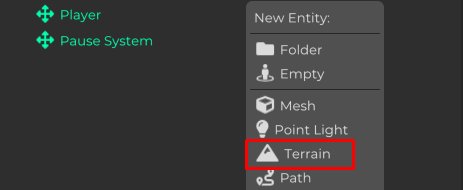
The first option is to right-click inside the Scene Graph and select the Terrain option.
This will automatically create a new Entity in the scene with the necessary Terrain setup.
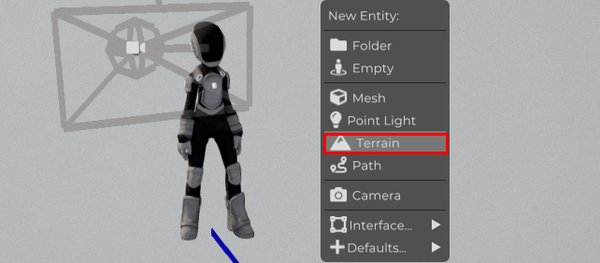
Another option is to use the Shift + A shortcut while hovering the 3D View, and then choose Terrain.
This is a quick way to add new Entities directly from the viewport, especially when you are already working inside the scene and want to keep your workflow fast.
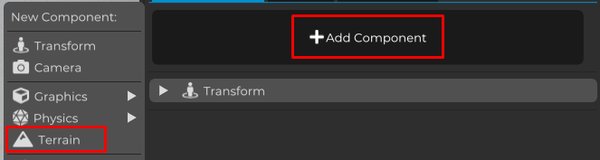
You can also create a regular Entity and manually add the Terrain component through the components panel.
All of these options lead to the same final result: a terrain being created in your scene.
The difference is mostly workflow. Using the Scene Graph or the Shift + A shortcut is faster, while manually adding the component gives you a better understanding of how the terrain is structured internally as an Entity with a Terrain Component.
By default, terrains created in Cave Engine have a size of 1600 × 1600.
This value can be changed depending on the needs of your project. You can create smaller terrains for compact levels or larger terrains for open areas and exploration-based games.
Keep in mind that terrain size affects how your world will be structured, so it is a good idea to think about the scale of your level before spending too much time sculpting and painting.
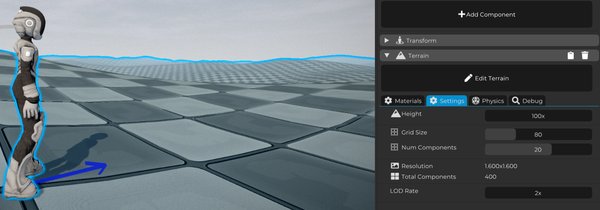
At this point, you already have a terrain in your scene and can start configuring it.
In the next lessons, we will explore how to edit the terrain, sculpt its shape, adjust its settings, and start turning this flat surface into an actual game environment.