Welcome to the Cave Engine 1.6.3 release notes.
This is a patch release, so it is not a huge update, but it still delivers several quality-of-life improvements, a few new features, and important fixes. Let’s dive in.
New RigidBody Component UI
We have completely redesigned the RigidBody component UI in the editor to make it clearer, cleaner, and easier to use:
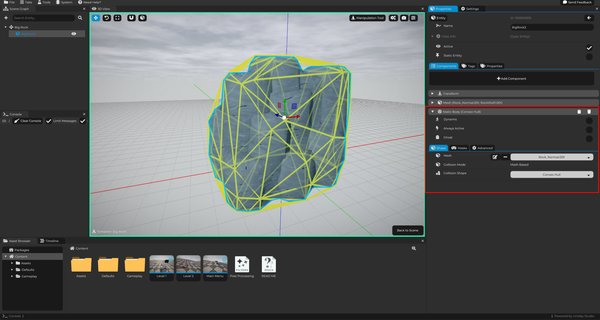
We also fixed the convex hull physics debug visualization. Previously, convex hulls were always being drawn as triangle meshes, which did not accurately represent the actual physics shape. This has now been corrected.
Cave Remote Control (CLI for AI Agents)
We know that people either love or hate AI, but many Cave users have been asking for better AI-assisted tools. Because of that, we have continued improving Cave Remote Control and the Cave CLI, our command-line interface, to make AI-assisted workflows more useful.
The Cave CLI is a Python script that Cave automatically creates inside your project when you create a new project. It is generated alongside an AGENTS.md file, which contains custom instructions and explanations for AI agents. These instructions explain how the agent can use and modify Cave projects, as well as how to interact with the Cave command-line interface.
As long as Remote Control is enabled in Cave, an AI agent can communicate with the editor, make changes for you, and even help you better understand your code.
For example, we prompted Codex 5.5 with the following request:
To test AI Remote Control, create a new scene with terrain, then add a group of cubes randomly placed across it. Each cube should have a Python script that randomly rotates it.
It completed the task without any issues:
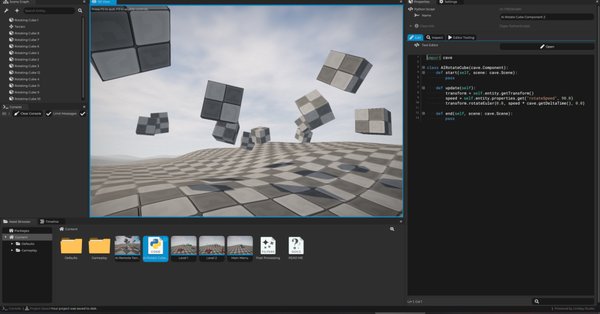
Of course, this is just a basic example. It can do much more, but this is enough to demonstrate what AI Remote Control is capable of.
With the new command-line interface, an AI agent can quickly understand the project context, see what you are seeing in the engine, inspect your current selection, identify the active asset in the Properties tab, read the hierarchy of your Asset Browser, make changes, run scripts, save your project, and much more.
We tested this workflow with OpenAI Codex and Anthropic Claude Code (Opus and Sonnet).
We have also been improving the use of AI to help users learn the engine: All Learn Quests, including but not limited to the Cave Engine related quests, are automatically localized into multiple languages, such as Brazilian Portuguese, Spanish, Russian, German, Japanese, Chinese, and others. This makes the learning experience more comfortable and accessible for more users.
The Learn Quests themselves are not AI-generated: They are created by us here in the studio.
However, they are automatically localized into different languages. We also have more Learn Quests in development, which will be released in the future.
Additionally, we now have a new support bot on our website (login and open the Direct Messages to see it). It was designed to answer questions based on the Learn Quests, helping users find guidance more easily. If you still need human help, reach out on our discord server.
NOTE: It's important to reiterate that we do not intend to turn Cave into an "AI slop" or to recklessly embed AI agents directly into the engine. What we do want is to facilitate our users creationexperience according to their usage and needs.
Logic Bricks
We have been working hard to improve Logic Bricks because we strongly believe they are a great no-code alternative for creators.
In this version of the engine, we improved the backend systems and fixed several issues related to error handling. When there is an Error, it will show more information about what happened, highlight in red the pins with problems and also propagate back the error messages to help you find the root cause of it.
We also completely rewrote the Logic Brick drawing backend for the editor. This should make the system more stable, while also giving us a stronger foundation to expand Logic Bricks in the near future. Internally, we have been working on a new visual scripting solution for Shader creation and that's one of the main reasons we changes the internals. Once this new system is complete, this will allow you to create custom shaders without writing code, in a workflow very similar to Blender’s material system.
This feature is not ready yet and is not included in this release, but you can expect more information about it in the near future.
Various Other Improvements
- Manipulation Tool: Now you can press Ctrl + X to cut the selected Entities while copying it to clipboard.
- Reinforced the OpenGL State Changes more to avoid any GPU specific issues
Work In Progress and Internal Progress:
We would also like to briefly mention a few work-in-progress features that are not ready yet, but are worth keeping on your radar:
As mentioned earlier, we have been working on a new shader editing system. We have also been developing a new Ragdoll component system, which is planned to make it much easier to add ragdoll physics to skeletal animations in the future. These features are still under development, not confirmed for a specific release, and should be considered experimental for now.
Beyond that, we are continuing to create more Learn Quests to help you explore different areas of the engine, including Logic Bricks, the user interface, terrain manipulation, the Path component, and more.
Fixes:
- Fix: The mouse was not being hidden during Mouselook on Entity Template Editor
- Fix: RigidBody Component Debug Convex Hull Drawing
- Fix: Manipulation Tool: Pasting an Entity to an Entity Template Editor was causing issues
- Fix: Wrong OpenGL States during Terran Layer Drawing, causing layer blend issues on some GPUs
- Fix: CaveCLI.py was not getting Print outputs back to the caller
- Fix: Logic Brick mistakenly showing Errors